02 Staff
Time clock
If you arrive earlier, leave later or take a longer break, you record the deviation yourself. The difference goes into your time account.
- For
- Staff
Deviations only. Rostify records working time passively from the roster. Only clock in or out if your start or end differs from your scheduled shift and no supervisor does it for you. Only record breaks if they exceed the normal break.
The time clock is only available if your organisation has enabled it for staff and the month has been published.
Recording an entry
- Open
My Rosterand clickClock. - At the top, select IN (Clock in), OUT (Clock out) or BREAK (Extended break).
- Select the Date – today or yesterday.
- Enter the time; the current time is prefilled. For BREAK, enter the length of the break, for example 00:45.
- Click
SAVE. Confirmation: Thank you for clocking in/out or setting break.
How Rostify calculates
| Entry | Difference |
|---|---|
| Clock in before shift start | Plus, by the time you arrived earlier |
| Clock out after shift end | Plus, by the time you left later |
| Clock in after shift start or clock out before shift end | Minus |
| Extended break | Minus, by the length of the break |
| Clock in and clock out on a day without a shift | The entire time in between |
The deviations of a day are added together. After a night shift you can only record Clock out on the following day if the shift ended no more than seven hours earlier.
Each day has exactly one Clock in, one Clock out and one break. On days with an absence or overtime, the supervisor makes the entries.
The daily list
The whole month is listed below the input fields:
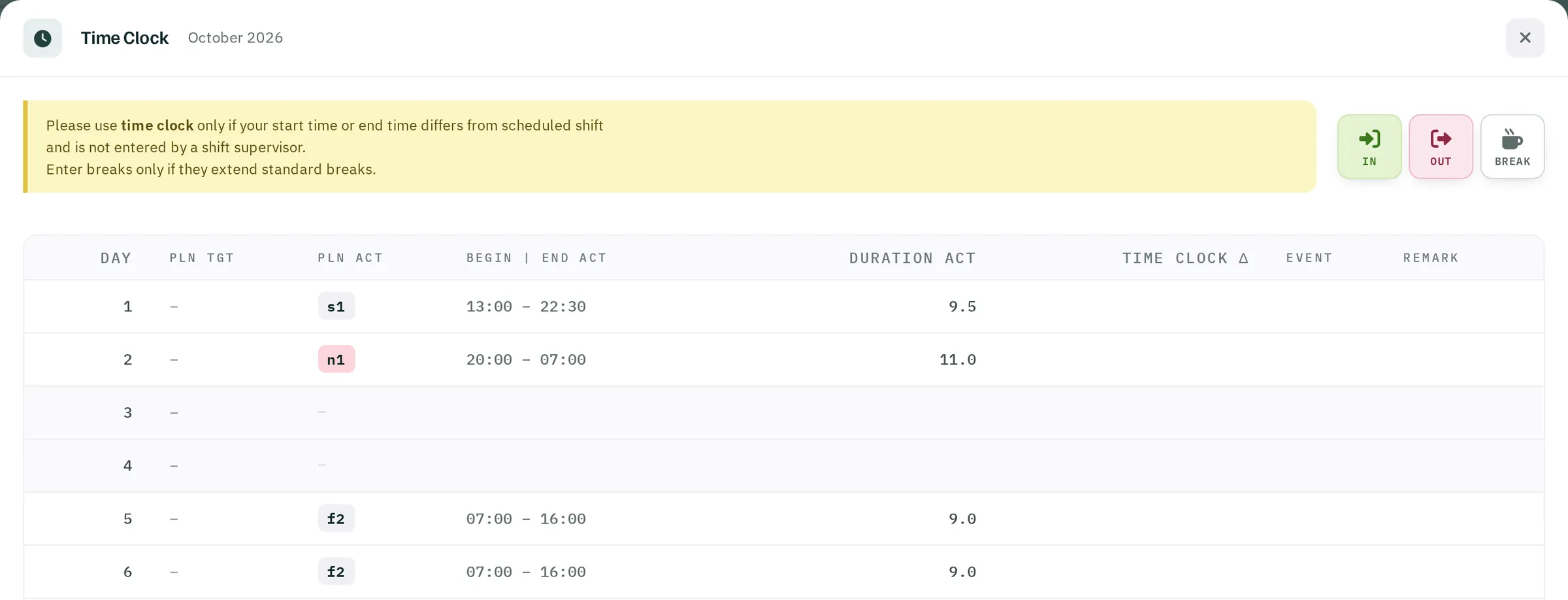
| Column | Content |
|---|---|
| Day | Date |
| PLN TGT | Shift originally scheduled |
| PLN ACT | Current shift, overtime or absence |
| Begin | End ACT, Duration ACT | Times according to the current state |
| Time Clock Δ | The day's difference, + or − |
| Event | Your entries as symbols |
| REMARK | Free text on the difference, up to 25 characters, can be changed for two days |
Correcting entries
You can delete your own entry within 5 minutes with ✕ on the event. Clock in can only be deleted once there is no Clock out any more. Older entries and entries made by a supervisor are corrected by the supervisor.