04 Supervisor
Situation on the dashboard
For each day, the supervisor board shows which shifts in the pattern are covered, where someone is missing and who is on duty in addition. It also lists expected calls and offers the FACK fatigue check.
- For
- Supervisor
- Observer
The supervisor board
The board sits on the dashboard below the first row of cards. It appears as soon as you are a supervisor or observer in a unit. It is hidden on smartphones.
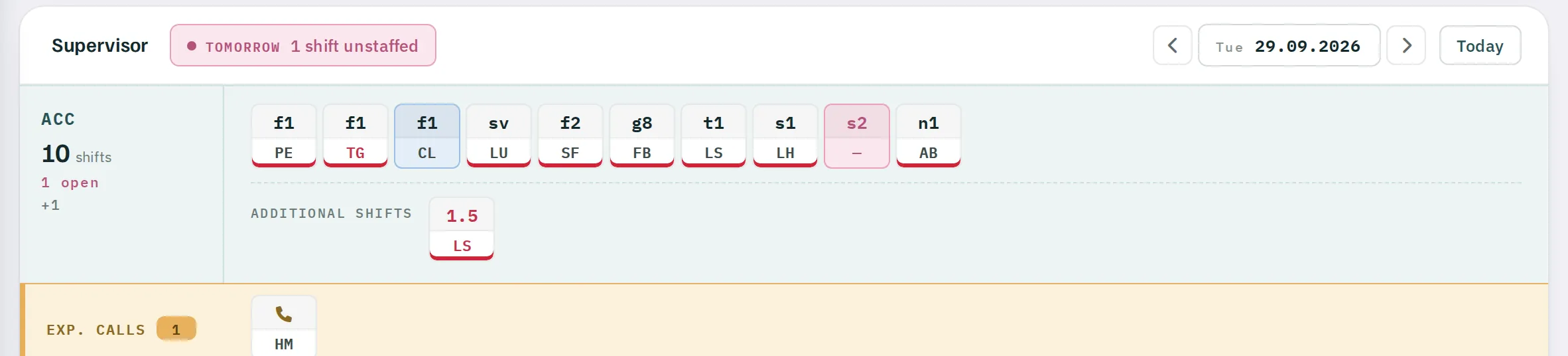
Choosing a day
Use ‹ and › to move one day at a time; the date field opens a calendar covering six days back to 14 days ahead. Any day other than today is highlighted in colour. Today takes you back.
One band per unit
For each of your units, a band shows:
- the name of the unit and the number of shifts,
- %d open if shifts required by the pattern are missing,
+nfor additional shifts outside the pattern,- in the first row, one chip per shift in the pattern, with the shift code and initials,
- in the second row, Additional shifts: office and training shifts as well as overtime by the hour.
If the month has not yet been published, the band reads NOT yet published.
The colours
- Standard – shift covered as per the pattern.
- Multiple assigned – surplus: the shift has been scheduled more often than needed.
- Unassigned – a scheduled shift has dropped out, for example through sickness.
- Never assigned – the shift is in the pattern but was never scheduled.
- ABRed initials – overtime, fully replacing a missing shift.
- ABOchre initials – partly replaced.
- Additional shifts – outside the pattern.
- Briefing unread – underlined in red: the person has not yet read a valid compulsory briefing. Today only.
Tooltips show shift times, name and telephone number. A person who has been replaced disappears from the chip; the replacement appears in their place.
EXP. CALLS – expected calls
The EXP. CALLS row lists everyone on sick report with no known end date whose next call is due on the selected day or already overdue. Clicking a chip opens the unit's Absence page. With no calls due, it reads No expected calls.
Duty roster in the warnings
For today and tomorrow, the Warnings card shows supervisors, per unit:
- %d shift(s) unstaffed – shifts in the pattern that nobody is working,
- %d overtime(s) still open – advertised shifts that have not yet been assigned.
The tile becomes clickable as soon as there is overtime to assign, and takes you to the absence list. Shifts that are simply unstaffed are filled by the planner in the roster.
FACK – fatigue check
With FACK (Fatigue check for a date) you check in advance whether someone may take on an additional shift on a given day.
- Enter the initials. Unknown initials turn the field pink and
CHECKstays disabled. - Choose the date – from two days back to eleven days ahead.
- Choose a shift or
Time. WithTime, enter the start and duration yourself. - Click
CHECK. The result appears line by line.
| Check | PASSED if |
|---|---|
| Rest time before | rest before the shift is at least 10 h – or 8 to 10 h if it is followed by 15 h of rest or the previous shift itself followed 15 h of rest |
| Rest time after | the same, mirrored, after the shift |
| Hours Mo-So | no more than 60 hours in the calendar week, across all units |
| Hours in sequence | no more than 60 hours between two blocks of days off |
| Max. shift sequence | no more than 7 shifts in a row |
| Weekly rest | weekly rest of at least 36 h – otherwise VERIFY |
If the person already has a shift, overtime or an absence on that day, ON DUTY OR ABSENT appears first in red. If they lack the licence for the shift, only Staff not licensed for this shift appears.
FACK checks rules but does not decide. VERIFY means the weekly rest is shorter than 36 hours – check whether your regulations allow this in the individual case.