05 Rostering
Resource planning
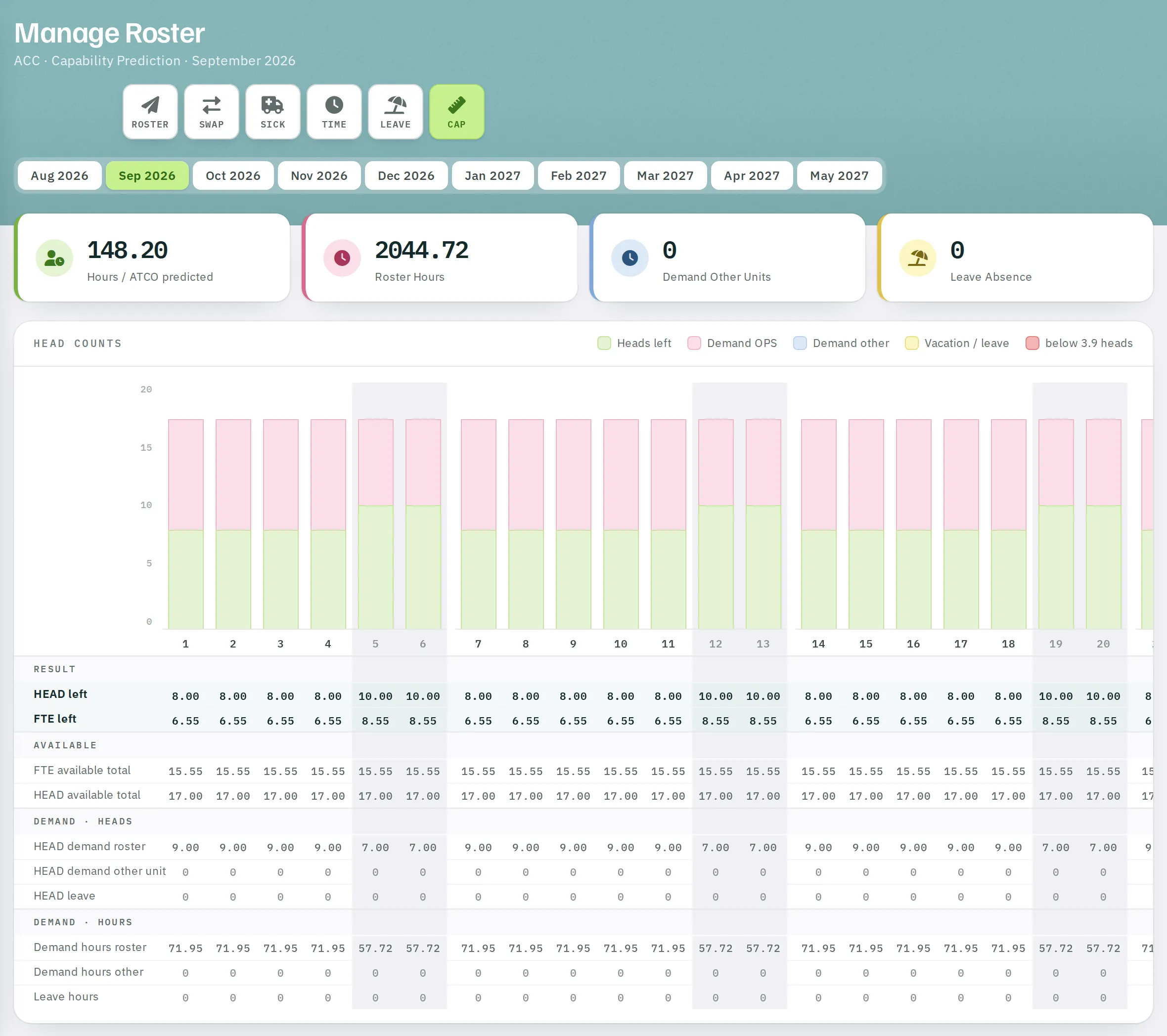
Resource planning (CAP) calculates, for each day of the coming months, how many heads remain after the pattern, assignments in other units and absences – the basis for leave decisions and medium-term staff planning.
- For
- Planner
CAP in the Manage Roster toolbar opens resource planning for the current month. Use the tabs to choose a different month – from the previous month up to eight months ahead. Whether CAP is available depends on your organisation's service scope.
Figures
| Tile | Meaning |
|---|---|
| Hours / ATCO predicted | The expected monthly hours per full-time employee if the entire demand is distributed. |
| Roster Hours | Hours of all working shifts of the pattern in the month. |
| Demand Other Units | Hours your staff work in other units. |
| Leave Absence | Hours from open leave requests and entered absences. |
Head counts chart
For each day, a stacked bar made up of Heads left, Demand OPS, Demand other and Vacation / leave. The colour of Heads left gives a warning:
- red – below the minimum staffing set for the unit,
- light red – below 130 % of this limit (below … heads).
Weekends and public holidays are marked; the tooltip shows the day's values.
Table
| Block | Rows |
|---|---|
| Result | HEAD left · FTE left |
| Available | FTE available total · HEAD available total |
| Demand · Heads | HEAD demand roster · HEAD demand other unit · HEAD leave |
| Demand · Hours | Demand hours roster · Demand hours other · Leave hours |
How it is calculated
- Heads available – active staff of the unit. FTE available – their employment levels minus their office share.
- Demand roster – the number of shifts in the pattern on that day.
- Demand other – assignments of your staff in other units.
- Leave – open requests and entered absences.
- Heads left = available − demand roster − demand other − leave.
Open leave requests already count as absence. This lets you see before deciding whether a request would push staffing below the limit.