05 Rostering
Optimal pattern
From the position plan, Rostify calculates the shifts that cover the demand for each weekday – with breaks, briefing and supervisor rules. The result compares optimal shift times with your existing shifts and can be applied directly to the pattern.
- For
- Planner
The calculator sits at the top of the form for a new pattern: Manage Patterns → New → Optimal pattern · From position plan.
Calculating
- Choose a position plan – the cards show all plans with period, positions and peak.
- Pattern from and until – the period must lie within the position plan (Within the plan). If it overlaps an existing pattern, Rostify points this out: saving would not be possible later.
- Calculation: Employee-friendly keeps work blocks short (ideally one hour at a time). Economical looks for the lowest number of staff hours.
- Shift length: Normal or Long – with Long, Rostify prefers fewer but longer shifts.
- Briefing: at the Start, at the End, Both (start or end) or None.
- Click
Calculate. The calculation runs on the server for no more than five minutes; the bar shows the progress.
You can leave the page in the meantime. The result stays stored in your browser and reappears the next time you open the page – with a notice if the position plan, rules or shifts have changed since. Recalculate then runs the calculation again.
The result
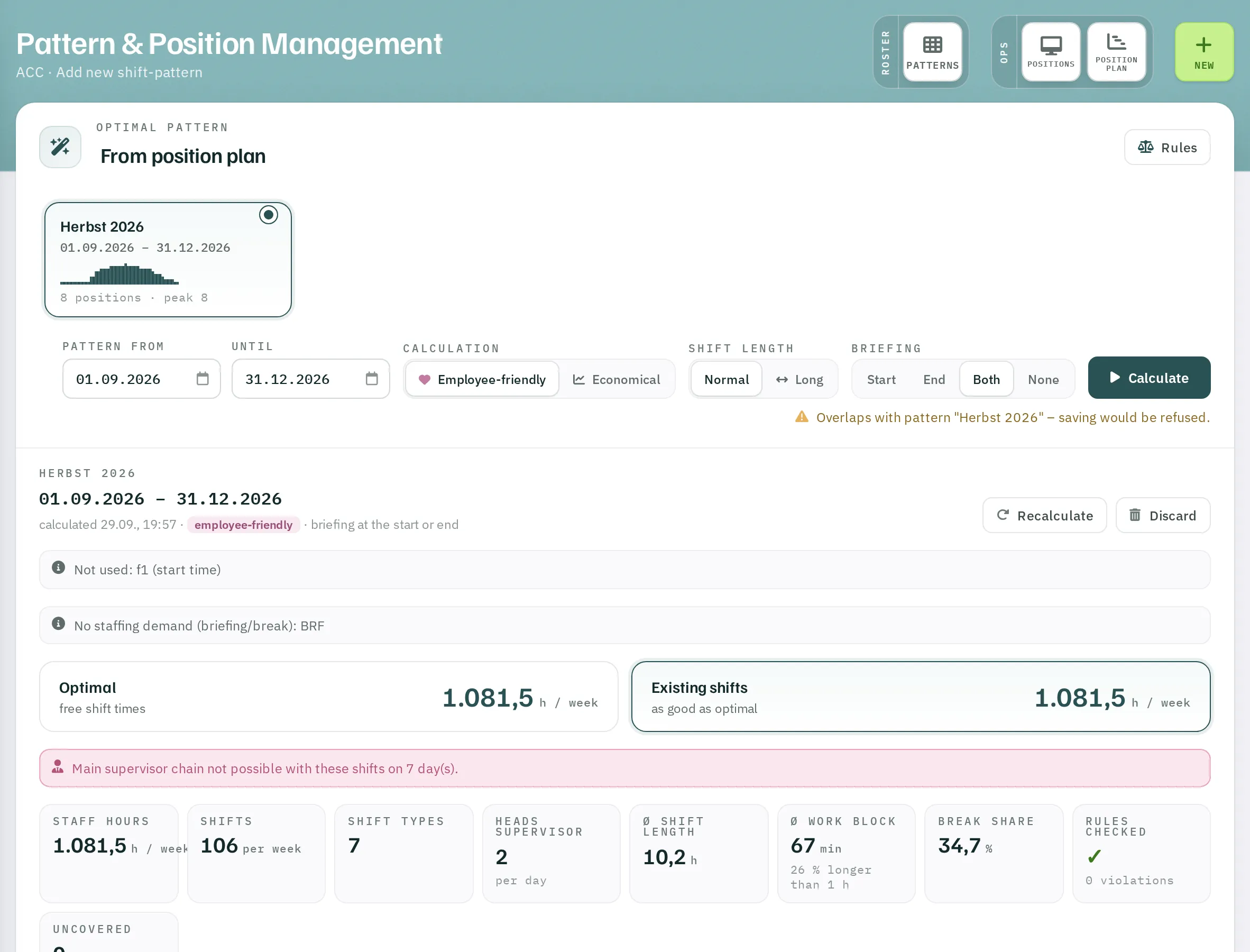
Optimal and existing shifts
Two cards compare:
- Optimal – with freely chosen shift times: the lowest staff hours per week.
- Existing shifts – using only the shifts your unit already has. If the result is just as good, it says as good as optimal; otherwise it shows the additional hours per week.
Notices above them state what was not used – for example shifts with an unsuitable start time, or positions without staffing demand such as briefing and break.
Figures
| Figure | Meaning |
|---|---|
| Staff hours | hours per week |
| Shifts | shifts per week |
| Shift types | how many different shifts are needed |
| Heads Supervisor | supervisors per day |
| Ø shift length | average duration |
| Ø work block | average continuous time on position, with the share of longer blocks |
| Break share | share of breaks in the shift time |
| Lower bound | computed minimum with fractions of people – only with Economical |
| Rules checked | ✓ or the number of violations |
| Uncovered | hours per week that cannot be covered, and why |
Required shifts
The table lists each shift with its times, duration and required licences, the matching code from your shift list and the count per weekday and per week.
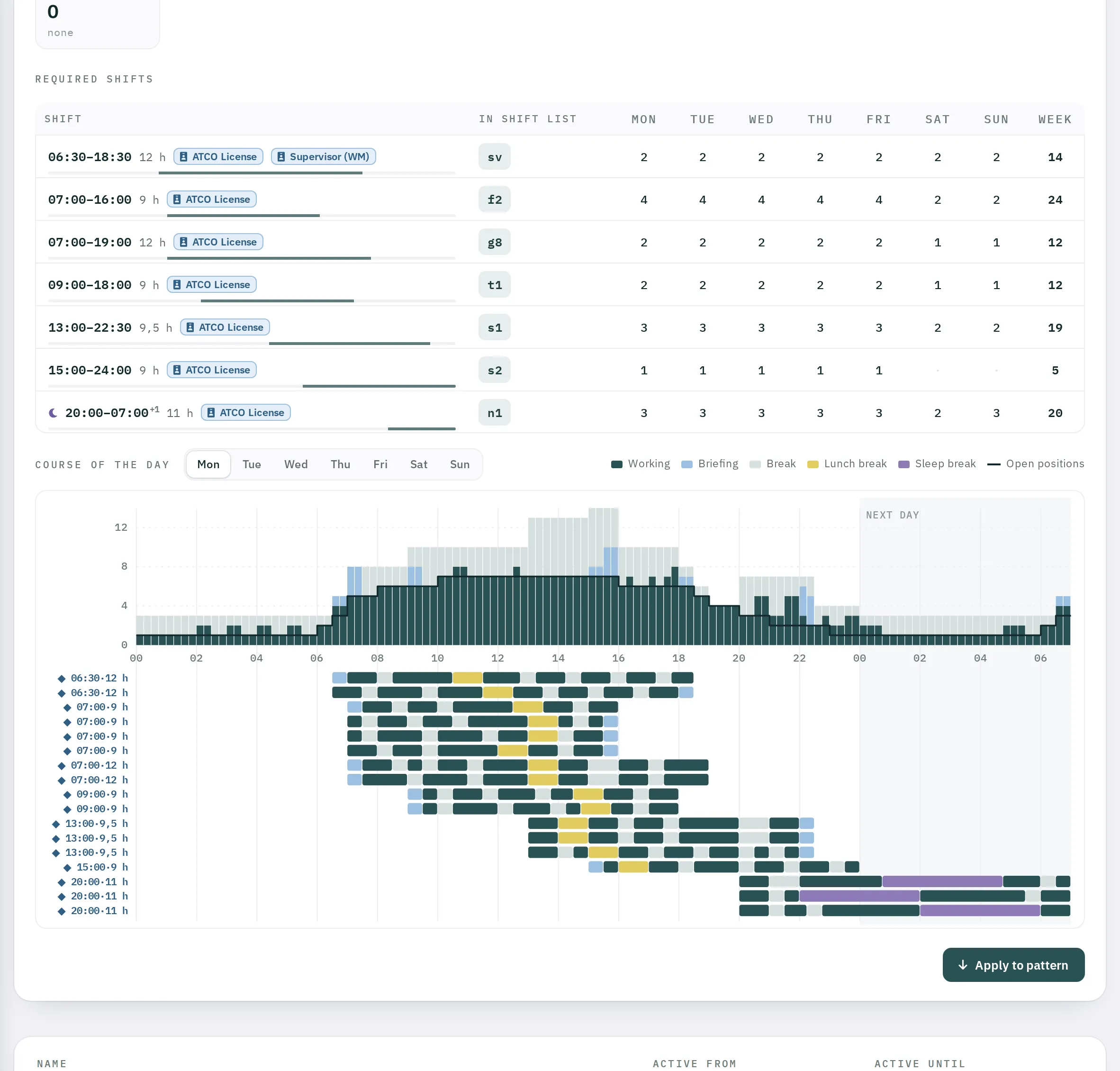
If the In shift list column says does not exist, your unit has no shift with this start and duration. Create it under Shifts – the Create under Shifts link takes you straight there. Back in the calculator, Rostify recognises the new shift.
Course of the day
For each weekday, the chart shows how many people are Working, in Briefing, on a Break, on a Lunch break or on a Sleep break at each time of day – against the line of Open positions. Night shifts run into the following day. The diamonds above the chart mark the shift start times.
Applying the result
- Click
Apply to pattern. If shifts are missing, Rostify first tells you how many: Create the missing shifts first. - The form below is now filled in. Check Name, Active From, Active Until and the week pattern.
- Click
Save pattern.
Discard deletes the result.
The rules
Rules at the top right shows the parameters used for the calculation:
| Rule | Parameter |
|---|---|
| Shift length | day shift 8 to 12 h, night shift up to 12.5 h |
| Day shift | start 06:30 to 19:00, end by 24:00 |
| Night shift | start 18:00 to 20:00, end 06:00 to 07:00, 4 h continuous sleep break, no briefing |
| Working time in a row | no more than 1.5 h; 2 h before a break of 1 h or more, or before the end of the shift; up to 4.5 h at night |
| Breaks | at least 27 % of the shift, shortest 30 min |
| Lunch break | from 6 h of duty, one hour between 10:30 and 17:00, within the first 7 h |
| Licenses | a position that requires a licence needs a shift with that licence |
| Existing shifts | are preferred if start and duration differ by no more than 30 min |
| Briefing | 30 min |
| Standby | counts as working time |
| Supervisor | own positions only, break share 19 %, one daily chain 12 h day → 12 h night, as few heads as possible |
The parameters are stored for your organisation; Rostify support sets up any deviations.
If Rostify finds no suitable shifts for the supervisor chain, a message appears, for example Main supervisor chain not possible with these shifts on 7 day(s). Check whether there is a day shift and a night shift with the supervisor licence that follow on from each other.